HTML BASIC
HTML Introduction
HTML Getting Started
HTML Elements
HTML Attributes
HTML Headings
HTML Paragraphs
HTML Links
HTML Text Formatting
HTML Styles
HTML Images
HTML Tables
HTML Lists
HTML Forms
HTML Iframes
HTML ADVANCED
HTML Doctypes
HTML Layout
HTML Head
HTML Meta
HTML Scripts
HTML Entities
HTML URL
HTML URL Encode
HTML Validation
HTML5 FEATURES
HTML5 New Input Types
HTML5 Canvas
HTML5 SVG
HTML5 Audio
HTML5 Video
HTML5 Web Storage
HTML5 Application Cache
HTML5 Web Workers
HTML5 SSE
HTML5 Geolocation
HTML5 Drag & Drop
HTML Headings - Html5 基础教程 - IT书包
网站首页
HTML Headings
### Organizing Content with Headings Headings help in defining the hierarchy and the structure of the web page content. HTML offers six levels of heading tags, `<h1>` through `<h6>`; the lower the heading level number, the greater its importance — therefore `<h1>` tag defines the most important heading, whereas the `<h6>` tag defines the least important heading in the document. By default, browsers display headings in larger and bolder font than normal text. Also, `<h1>` headings are displayed in largest font, whereas `<h6>` headings are displayed in smallest font. ```html <h1>Heading level 1</h1> <h2>Heading level 2</h2> <h3>Heading level 3</h3> <h4>Heading level 4</h4> <h5>Heading level 5</h5> <h6>Heading level 6</h6> ``` — The output of the above example will look something like this: 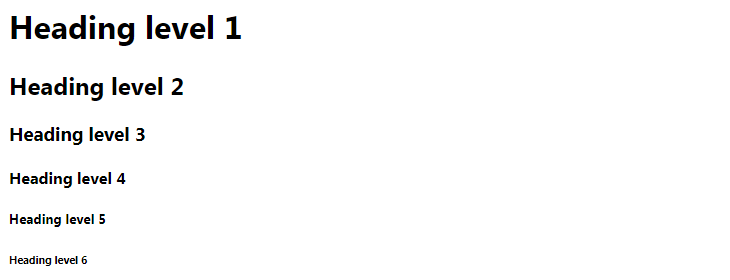 > Note: Each time you place a heading tag on a web page, the web browser built-in style sheets automatically create some empty space (called margin) before and after each heading. You can use the CSS margin property to override the browser's default style sheet. > Tip: You can easily customize the appearance of HTML heading tags such as their font size, boldness, typeface, etc. using the CSS font properties. ### Importance of Headings - HTML headings provide valuable information by highlighting important topics and the structure of the document, so optimize them carefully to improve user engagement. - Don't use headings to make your text look BIG or bold. Use them only for highlighting the heading of your document and to show the document structure. - Since search engines, such as Google, use headings to index the structure and content of the web pages so use them very wisely in your webpage. - Use the `<h1>` headings as main headings of your web page, followed by the `<h2>` headings, then the less important `<h3>` headings, and so on. > Tip: Use the `<h1>` tag to mark the most important heading which is usually at the top of the page. An HTML document generally should have exactly one `<h1>` heading, followed by the lower-level headings such as `<h2>`, `<h3>`, `<h4>`, and so on.
上一篇:
HTML Attributes
下一篇:
HTML Paragraphs

