Redis 简介
Redis 教程
Redis 安装
Redis 配置
Redis 数据类型
Redis 命令
Redis 命令
Redis 键(key)
Redis 字符串(String)
Redis 哈希(Hash)
Redis 列表(List)
Redis 集合(Set)
Redis 有序集合(sorted set)
Redis HyperLogLog
Redis 发布订阅
Redis 事务
Redis 脚本
Redis 连接
Redis 服务器
Redis 进阶教程
Redis 数据备份与恢复
Redis 安全
Redis 性能测试
Redis 客户端连接
Redis 管道技术
Redis 分区
Java 使用 Redis
PHP 使用 Redis
PHP 使用 Redis - Redis 教程 - 光年文档管理系统(Light Year Doc)
网站首页
PHP 使用 Redis
## 安装 开始在 PHP 中使用 Redis 前, 我们需要确保已经安装了 redis 服务及 PHP redis 驱动,且你的机器上能正常使用 PHP。 接下来让我们安装 PHP redis 驱动:下载地址为:[https://github.com/phpredis/phpredis/releases。](https://github.com/phpredis/phpredis/releases) ### PHP安装redis扩展 以下操作需要在下载的 phpredis 目录中完成: ```bash $ wget https://github.com/phpredis/phpredis/archive/2.2.4.tar.gz $ cd phpredis-2.2.7 # 进入 phpredis 目录 $ /usr/local/php/bin/phpize # php安装后的路径 $ ./configure --with-php-config=/usr/local/php/bin/php-config $ make && make install ``` 如果你是 PHP7 版本,则需要下载指定分支: ```bash git clone -b php7 https://github.com/phpredis/phpredis.git ``` ### 修改php.ini文件 ```bash vi /usr/local/php/lib/php.ini ``` 增加如下内容: ```bash extension_dir = "/usr/local/php/lib/php/extensions/no-debug-zts-20090626" extension=redis.so ``` 安装完成后重启php-fpm 或 apache。查看phpinfo信息,就能看到redis扩展。 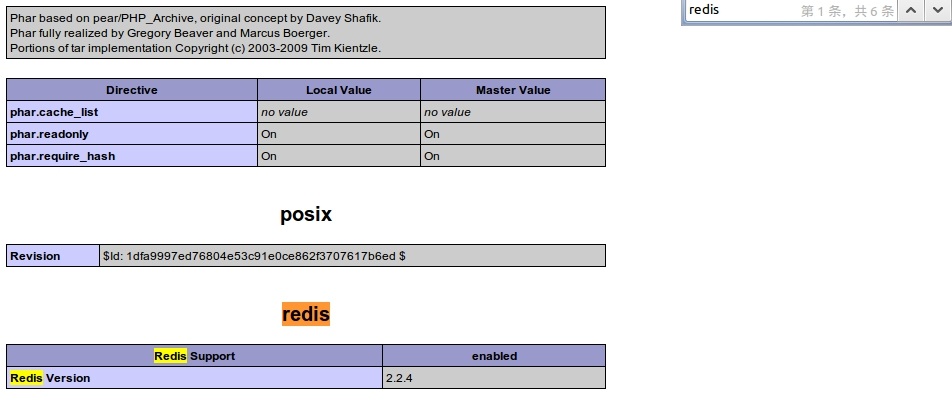 ## 连接到 redis 服务 ```php // 连接本地的 Redis 服务 $redis = new Redis(); $redis->connect('127.0.0.1', 6379); echo "Connection to server sucessfully"; // 查看服务是否运行 echo "Server is running: " . $redis->ping(); ``` 执行脚本,输出结果为: ``` Connection to server sucessfully Server is running: PONG ``` ## Redis PHP String(字符串) 实例 ```php // 连接本地的 Redis 服务 $redis = new Redis(); $redis->connect('127.0.0.1', 6379); echo "Connection to server sucessfully"; // 查看服务是否运行 echo "Server is running: " . $redis->ping(); ``` 执行脚本,输出结果为: ``` Connection to server sucessfully Server is running: PONG ``` ## Redis PHP List(列表) 实例 ```php // 连接本地的 Redis 服务 $redis = new Redis(); $redis->connect('127.0.0.1', 6379); echo "Connection to server sucessfully"; // 存储数据到列表中 $redis->lpush("tutorial-list", "Redis"); $redis->lpush("tutorial-list", "Mongodb"); $redis->lpush("tutorial-list", "Mysql"); // 获取存储的数据并输出 $arList = $redis->lrange("tutorial-list", 0 ,5); echo "Stored string in redis"; print_r($arList); ``` 执行脚本,输出结果为: ``` Connection to server sucessfully Stored string in redis Redis Mongodb Mysql ``` ## Redis PHP Keys 实例 ```php // 连接本地的 Redis 服务 $redis = new Redis(); $redis->connect('127.0.0.1', 6379); echo "Connection to server sucessfully"; // 获取数据并输出 $arList = $redis->keys("*"); echo "Stored keys in redis:: "; print_r($arList); ``` 执行脚本,输出结果为: ``` Connection to server sucessfully Stored string in redis:: tutorial-name tutorial-list ```
上一篇:
Java 使用 Redis

